Tuesday, 20 January 2015

SQL SERVER – Search Text Field – CHARINDEX vs PATINDEX


Both functions take two arguments. With PATINDEX, you must include percent signs before and after the pattern, unless you are looking for the pattern as the first (omit the first %) or last (omit the last %) characters in a column. For CHARINDEX, the pattern cannot include wildcard characters. The second argument is a character expression, usually a column name, in which Adaptive Server searches for the specified pattern.
Example of CHARINDEX:
USE AdventureWorks;GOSELECT CHARINDEX('ensure'DocumentSummary)FROM Production.DocumentWHERE DocumentID 3;GO
Examples of PATINDEX:
USE AdventureWorks;GOSELECT PATINDEX('%ensure%',DocumentSummary)FROM Production.DocumentWHERE DocumentID 3;GO
Summary:
PATINDEX is CHARINDEX + WildCard Search. Use either of them depending your need

Monday, 19 January 2015

SSIS Task -- Aggregate and Audit

                                        Aggregate

Here we are selecting the columns that we need a Grouping of data as shown in the screen. And after selecting the number of columns for the group then click on the OK button to get configured. Now configure the Flat File Destination as shown in the screen below.


Once everything is configured your screen will look as shown in the screen below:


Now Hit F5; the application will run and show the output as shown in the screen below:

Here the numbers of rows are indicated at the bottom of each control as shown in the screen above. And finally the results (Grouping of the columns based on product) are loaded to a flat file destination which looks like below:


Audit 

Here you can find the packageName and the VersionID at the right end for all the records which satisfied the condition.


Value
Variable Name
Description
0
ExecutionInstanceGUID
GUID that identifies the instance running
1
PackageID
Unique identifier od the package running
2
PackageName
Name of the package
3
VersionID
Version ID of the package
4
ExecutionStartTime
Time when the package is started
5
MachineName
Computer Name on which package running
6
UserName
User Name under which package running
7
TaskName
Name of the task which is running
8
TaskId
Unique identifier of the task running

Monday, 12 January 2015

SQL FULL OUTER JOIN Keyword

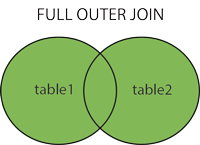
The FULL OUTER JOIN keyword returns all rows from the left table (table1) and from the right table (table2).
The FULL OUTER JOIN keyword combines the result of both LEFT and RIGHT joins.

SQL FULL OUTER JOIN Syntax

SELECT column_name(s)
FROM table1
FULL OUTER JOIN table2
ON table1.column_name=table2.column_name;
SQL FULL OUTER JOIN

Demo Database

In this tutorial we will use the well-known Northwind sample database.
Below is a selection from the "Customers" table:
CustomerIDCustomerNameContactNameAddressCityPostalCodeCountry
1Alfreds FutterkisteMaria AndersObere Str. 57Berlin12209Germany
2Ana Trujillo Emparedados y heladosAna TrujilloAvda. de la Constitución 2222México D.F.05021Mexico
3Antonio Moreno TaqueríaAntonio MorenoMataderos 2312México D.F.05023Mexico
And a selection from the "Orders" table:
OrderIDCustomerIDEmployeeIDOrderDateShipperID
10308271996-09-183
103093731996-09-191
103107781996-09-202


SQL FULL OUTER JOIN Example

The following SQL statement selects all customers, and all orders:

SELECT Customers.CustomerName, Orders.OrderID
FROM Customers
FULL OUTER JOIN Orders
ON Customers.CustomerID=Orders.CustomerID
ORDER BY Customers.CustomerName;

A selection from the result set may look like this:

CustomerNameOrderID
Alfreds Futterkiste
Ana Trujillo Emparedados y helados10308
Antonio Moreno Taquería10365
10382
10351

Sunday, 11 January 2015

SQL RIGHT JOIN Keyword

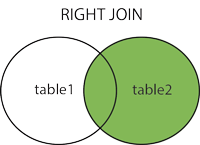
The RIGHT JOIN keyword returns all rows from the right table (table2), with the matching rows in the left table (table1). The result is NULL in the left side when there is no match.

SQL RIGHT JOIN Syntax

SELECT column_name(s)
FROM table1
RIGHT JOIN table2
ON table1.column_name=table2.column_name;
or:
SELECT column_name(s)
FROM table1
RIGHT OUTER JOIN table2
ON table1.column_name=table2.column_name;
PS! In some databases RIGHT JOIN is called RIGHT OUTER JOIN.
SQL RIGHT JOIN

Demo Database

In this tutorial we will use the well-known Northwind sample database.
Below is a selection from the "Orders" table:
OrderIDCustomerIDEmployeeIDOrderDateShipperID
10308271996-09-183
103093731996-09-191
103107781996-09-202
And a selection from the "Employees" table:
EmployeeIDLastNameFirstNameBirthDatePhotoNotes
1DavolioNancy12/8/1968EmpID1.picEducation includes a BA in psychology.....
2FullerAndrew2/19/1952EmpID2.picAndrew received his BTS commercial and....
3LeverlingJanet8/30/1963EmpID3.picJanet has a BS degree in chemistry....


SQL RIGHT JOIN Example

The following SQL statement will return all employees, and any orders they have placed:

Example


SELECT Orders.OrderID, Employees.FirstName
FROM Orders
RIGHT JOIN Employees
ON Orders.EmployeeID=Employees.EmployeeID
ORDER BY Orders.OrderID;

SQL LEFT JOIN Keyword

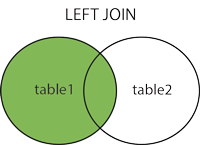
The LEFT JOIN keyword returns all rows from the left table (table1), with the matching rows in the right table (table2). The result is NULL in the right side when there is no match.

SQL LEFT JOIN Syntax

SELECT column_name(s)
FROM table1
LEFT JOIN table2
ON table1.column_name=table2.column_name;
or:
SELECT column_name(s)
FROM table1
LEFT OUTER JOIN table2
ON table1.column_name=table2.column_name;
PS! In some databases LEFT JOIN is called LEFT OUTER JOIN.

SQL LEFT JOIN

Demo Database

In this tutorial we will use the well-known Northwind sample database.
Below is a selection from the "Customers" table:
CustomerIDCustomerNameContactNameAddressCityPostalCodeCountry
1
Alfreds FutterkisteMaria AndersObere Str. 57Berlin12209Germany
2Ana Trujillo Emparedados y heladosAna TrujilloAvda. de la Constitución 2222México D.F.05021Mexico
3Antonio Moreno TaqueríaAntonio MorenoMataderos 2312México D.F.05023Mexico
And a selection from the "Orders" table:
OrderIDCustomerIDEmployeeIDOrderDateShipperID
10308271996-09-183
103093731996-09-191
103107781996-09-202


SQL LEFT JOIN Example

The following SQL statement will return all customers, and any orders they might have:

Example :


SELECT Customers.CustomerName, Orders.OrderID
FROM Customers
LEFT JOIN Orders
ON Customers.CustomerID=Orders.CustomerID
ORDER BY Customers.CustomerName;


Saturday, 10 January 2015

SQL INNER Join Keyword

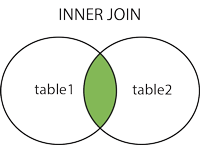
The INNER JOIN keyword selects all rows from both tables as long as there is a match between the columns in both tables.

SQL INNER JOIN Syntax

SELECT column_name(s)
FROM table1
INNER JOIN table2
ON table1.column_name=table2.column_name;
or:
SELECT column_name(s)
FROM table1
JOIN table2
ON table1.column_name=table2.column_name;
PS! INNER JOIN is the same as JOIN.
SQL INNER JOIN

Demo Database

In this tutorial we will use the well-known Northwind sample database.
Below is a selection from the "Customers" table:
CustomerIDCustomerNameContactNameAddressCityPostalCodeCountry
1Alfreds FutterkisteMaria AndersObere Str. 57Berlin12209Germany
2Ana Trujillo Emparedados y heladosAna TrujilloAvda. de la Constitución 2222México D.F.05021Mexico
3Antonio Moreno TaqueríaAntonio MorenoMataderos 2312México D.F.05023Mexico
And a selection from the "Orders" table:
OrderIDCustomerIDEmployeeIDOrderDateShipperID
10308271996-09-183
103093731996-09-191
103107781996-09-202


SQL INNER JOIN Example

The following SQL statement will return all customers with orders:

Example :

SELECT Customers.CustomerName, Orders.OrderID
FROM Customers
INNER JOIN Orders
ON Customers.CustomerID=Orders.CustomerID
ORDER BY Customers.CustomerName;

Note: The INNER JOIN keyword selects all rows from both tables as long as there is a match between the columns. If there are rows in the "Customers" table that do not have matches in "Orders", these customers will NOT be listed.

SQL JOIN

An SQL JOIN clause is used to combine rows from two or more tables, based on a common field between them.


Different SQL JOINs

Before we continue with examples, we will list the types the different SQL JOINs you can use:
  • INNER JOIN: Returns all rows when there is at least one match in BOTH tables
  • LEFT JOIN: Return all rows from the left table, and the matched rows from the right table
  • RIGHT JOIN: Return all rows from the right table, and the matched rows from the left table
  • FULL JOIN: Return all rows when there is a match in ONE of the tables

INNER JOIN :

The most common type of join is: SQL INNER JOIN (simple join). An SQL INNER JOIN return all rows from multiple tables where the join condition is met.
Let's look at a selection from the "Orders" table:
OrderIDCustomerIDOrderDate
1030821996-09-18
10309371996-09-19
10310771996-09-20
Then, have a look at a selection from the "Customers" table:
CustomerIDCustomerNameContactNameCountry
1Alfreds FutterkisteMaria AndersGermany
2Ana Trujillo Emparedados y heladosAna TrujilloMexico
3Antonio Moreno TaqueríaAntonio MorenoMexico

Notice that the "CustomerID" column in the "Orders" table refers to the "CustomerID" in the "Customers" table. The relationship between the two tables above is the "CustomerID" column.
Then, if we run the following SQL statement (that contains an INNER JOIN):

Example
SELECT Orders.OrderID, Customers.CustomerName, Orders.OrderDate
FROM Orders
INNER JOIN Customers
ON Orders.CustomerID=Customers.CustomerID;

It will produce something like this:

OrderIDCustomerNameOrderDate
10308Ana Trujillo Emparedados y helados9/18/1996
10365Antonio Moreno Taquería11/27/1996
10383Around the Horn12/16/1996
10355Around the Horn11/15/1996
10278Berglunds snabbköp8/12/1996